


Words of Wonders: Guru
4.95.65K Reviews
App Specs
- Version
- 3.2.2
- Updated On
- License
- Free
- Downloads
- 10,000,000+
- Developer
- Fugo Games
- Categories
- Word
- Platform
- Android, iOS
Screenshots
 Analysis by AppCompare
Ever wanted to embark on a journey that takes your vocabulary skills to the next level while exploring the wonders of the world? Well, my fellow word enthusiasts, Words of Wonders: Guru might just be your ticket to a delightful linguistic adventure. As someone who loves both words and travel, this app struck a chord with me, and I'm excited to share my thoughts after diving deep into its offerings.
Exploring the World, One Word at a Time
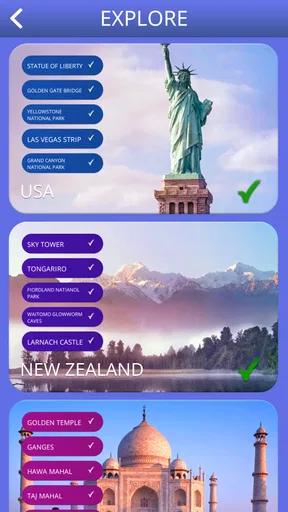
The first thing that caught my eye about Words of Wonders: Guru is its clever mashup of word puzzles and a travel theme. The app challenges you to solve crossword puzzles, with each level representing a different iconic location around the globe. Imagine starting your journey at the majestic Eiffel Tower and gradually moving on to the ancient Pyramids of Giza. It's like a world tour with a side of brain exercise!
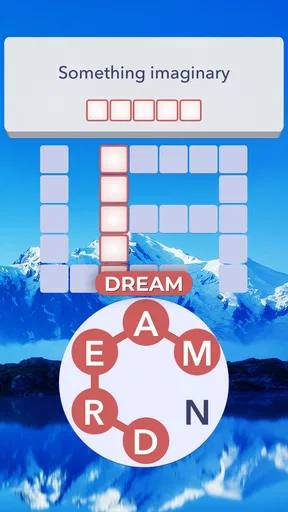
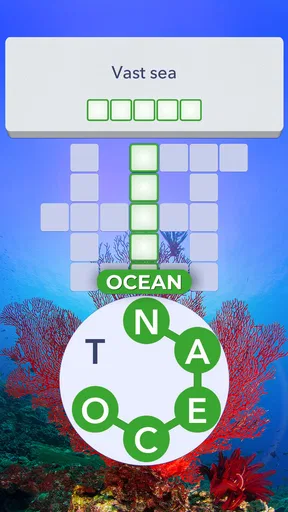
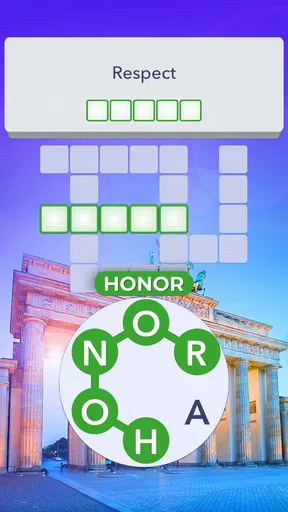
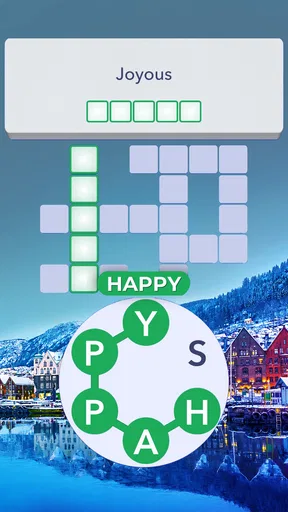
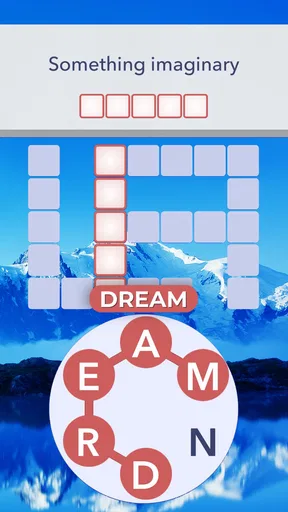
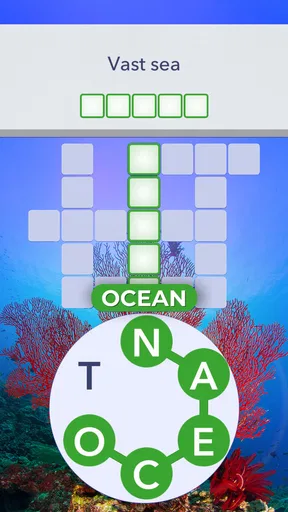
Each puzzle is made up of a grid filled with scrambled letters. Your task? Swipe and connect the letters to form words that fit into the crossword. It’s a bit like a mental yoga session, stretching your vocabulary muscles in every direction. And trust me, it’s a workout that’s both fun and satisfying.
The satisfying rhythm of a puzzle
The appeal is in the small cycle: I look at the open spaces, trace a possible word by swiping across the letters, and get immediate feedback from the board. When a word belongs in the crossword, its letters settle into place and give me a clearer picture of what is still missing. If it does not fit, I can try a different arrangement instead of starting the whole puzzle over. That quick test-and-adjust rhythm is what makes a short session feel complete.
A useful habit is to treat the crossword as a set of clues made from its own gaps. Rather than repeatedly hunting for one long word, I scan for short answers that can reveal crossing letters. Those letters narrow down the possibilities for the longer spaces, so each solved word does a little more than fill a box. When I’m stuck, I change my focus: I look for a different length, try a familiar ending, or revisit a gap after another answer has supplied new letters. It feels more rewarding than making random guesses.
The swiping itself is simple, but the thinking is not always easy. A group of letters can suggest several plausible combinations, and the crossword determines which ones matter. That distinction is important: this is not just a word-search game where I can collect every word I notice. The goal is to find the answers that belong in the layout. I like that constraint because it gives each successful swipe a clear purpose, though it can also make a puzzle feel stubborn when one expected word is not the one the grid needs.
Landmarks add atmosphere, not a geography lesson
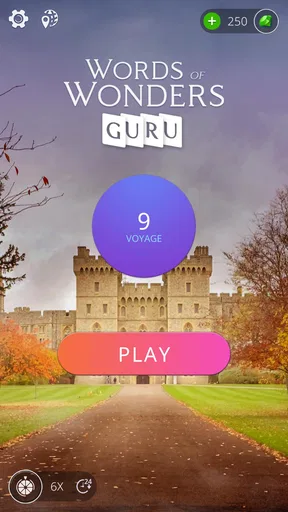
One of the coolest features of the app is its stunning visuals. The developers have done a fantastic job of incorporating vibrant imagery of famous landmarks into the background of each puzzle. This not only makes the game visually appealing but also adds a layer of immersion as you "travel" from one level to the next.
Worth Reading Before You Choose

Baby Panda World Brings Quick Play to Modern Phones, but Its Game Library Feels Busy

ESPN’s Live Game View Makes Following Close Games Easier

QuizzLand Review: A Good Fit for Short Trivia Breaks, Not Every Player

Basketball Stars: Multiplayer Is Fast, but Can It Recover When Matches Go Wrong?

WEBTOON Turns Phone Updates Into a Better Reading Routine

Link to Windows Runs on Shared Habits, Not Social Feeds
The setting works best as a gentle frame around the wordplay. I enjoy having a destination associated with progress, but I would not choose the game as a substitute for a travel guide or a way to learn detailed facts about a place. The main activity remains solving the crossword; the landmark gives the sequence a sense of movement and a more memorable backdrop. If you like a little visual context while playing, that pairing is pleasant. If you want an educational geography experience, you will need something more focused on that subject.
Because the board is the part demanding attention, I find it helps to pause on the image between puzzles rather than expect it to carry the experience. That small distinction sets the right expectation: the travel theme makes progress feel like a route, while the letter grid supplies the actual challenge. It also makes this a better fit for someone who likes a relaxed theme than for a player looking for elaborate story scenes or a detailed simulation of visiting landmarks.
Hints, events, and the choice to keep going
Words of Wonders: Guru also offers daily challenges and special events that spice up the gameplay. These events often come with unique themes and rewards, keeping things fresh and exciting. Plus, the app includes a handy "hint" system in case you get stuck, which is a lifesaver for those tricky words that just won’t come to mind.
I see a hint as a way to keep a session moving, not as a button to press at the first sign of difficulty. Before using one, I’ll try to work out which crossing letters could make sense or switch to a different open space. That pause is useful because solving a neighboring word may reveal the answer I was missing, and the eventual click feels earned. If I have already tested reasonable options and the puzzle has stopped being fun, though, using help is a sensible trade-off. The point is to enjoy the game, not to turn every board into a test of endurance.
Daily challenges can give a regular player a reason to open the game even when there is no time to progress through a longer stretch of puzzles. They suit a quick break, while special events add a change of theme and a reward to work toward. I would treat them as optional variety rather than a schedule I have to keep up with. If I miss a day or do not feel like taking part, the core crossword activity is still the reason to play; the extras should make the loop more inviting, not create pressure.
That balance matters for anyone wondering whether the game can be played casually. I can approach it as a brief diversion and stop after a completed puzzle, or keep moving when I have more time. The same open-ended feel is less appealing if you need a strict stopping point, a timed competitive match, or a lengthy narrative that decides what happens next. Here, the motivation is mainly the next board, another set of letters to untangle, and the small reward of seeing progress.
What the reward feels like—and when I stop
If you’re anything like me, the combination of word puzzles and the allure of virtual travel is enough to keep you hooked. But it’s the sense of accomplishment from completing each level that really keeps you coming back. There's something incredibly satisfying about filling in the last word of a puzzle and watching it reveal a new destination on your virtual map.
The reward is modest but well matched to the action: I finish the grid, see the board become complete, and get a clear sense that the level is done. That closure is why I often prefer this to an endless stream of loose word prompts. There is a before-and-after to each puzzle: an incomplete pattern, a few deductions, then a solved board. The next level offers a natural reset, with a fresh arrangement to inspect. I can put the phone down at that point without feeling that I have abandoned a complicated task.
A realistic use for me is a short wait between errands. I can open the game, work through a board at my own pace, and stop when it is complete instead of needing to remember where I was in a long story. It also works as a low-key wind-down when I want something interactive but not intense. I would not reach for it when I need to concentrate on a work call or when I am trying to fall asleep and want no screen at all; even relaxed puzzles still ask me to focus. The best moment is one where I have a few uninterrupted minutes and can enjoy figuring out the crossings.
There is a useful trade-off in the level-based loop. Completing one puzzle gives a clean stopping point, but seeing the next destination can make it tempting to continue. That is a pleasant nudge if I have time; it is not a reason to promise myself a single level will always remain a single level. If I want to keep a session brief, I decide before opening the next board that the solved one will be my finish. The game’s structure makes that boundary easier than in an endless mode, although the next challenge is always there to invite another try.
Who will enjoy this particular word game
Moreover, the app is designed in such a way that it caters to both casual players and hardcore wordsmiths. Whether you have a few minutes to spare or are looking to binge on word puzzles for a couple of hours, Words of Wonders: Guru adapts to your pace. And let’s not forget the social aspect—connect with friends and family, compare scores, and even lend each other a hand with particularly challenging puzzles.
I think it is especially well suited to people who enjoy crossword-style deduction but want the answers to come from a compact pool of letters rather than from written clues. It gives vocabulary-minded players a reason to examine spelling and word patterns, while the visual journey softens the feel of a plain puzzle book. A family member can also help by suggesting a word when I am stuck; even when only one person is holding the phone, calling out possibilities turns a quiet solo game into a small shared activity.
On the other hand, I would skip it if my priority were learning a language from scratch. Recognizing words and filling a grid can exercise vocabulary, but it is not the same as structured lessons, pronunciation practice, or conversation. It is also not the best match for someone who dislikes trial and error, gets frustrated when a plausible word does not fit, or wants every puzzle to be solved through an explicit clue. For those preferences, a conventional crossword with written definitions or a language-learning app would be a better choice.
Compared with a paper crossword, this game replaces written clues with letter combinations and crossings, so the challenge is less about interpreting a sentence and more about finding usable words from the available letters. Compared with a free-form word search, it asks for answers that complete a particular grid rather than rewarding every word that can be spotted. That makes it a middle ground: more guided than simply making words from letters, but less clue-driven than many traditional crosswords. Which style is best depends on whether you enjoy deduction from a layout or prefer a definition to point you toward the answer.
The social side can make a difficult board feel less solitary, but I would not treat competition as the main attraction. Comparing progress is a nice extra for friends who already enjoy word games; the core loop still works as a personal puzzle. If I want a direct head-to-head contest with a clear opponent and match format, I would choose a game built around that kind of competition instead. Here, sharing a suggestion or checking how someone else is doing is a lighter way to make the experience social.
Practical details before you install
Fugo Games is the developer behind this free word game. It has a 4.9 average from around 306,000 ratings, with about 5,400 written reviews and over 10 million installs. Those figures suggest that it has found a sizeable audience, though popularity by itself cannot tell me whether its particular puzzle style will suit you. The game is rated for Everyone, and the current version is 2.1.17; it requires Android 8.0 or later. It is also available on iOS, so the choice is not limited to Android users.
The game costs nothing to download, but it includes optional in-app purchases ranging from $0.39 to $39.99 per item. I would keep that in mind if I am installing it for a child or simply prefer to avoid accidental spending: check the purchase settings on the device and make sure the person playing understands that optional items can cost money. The presence of purchases does not change what kind of game it is, but it is worth knowing before handing over a phone. I also would not assume that every optional item is necessary to enjoy the word puzzles; I would first see how the ordinary play suits me.
A practical question is whether I need a long session to get anything out of it. Not really: the crossword format gives a puzzle a natural beginning and end, so a short play can feel complete. Another is whether I can rely on the app to teach unfamiliar vocabulary. I would treat any new word as a prompt to look it up elsewhere if I want a definition or fuller context, rather than assuming that solving the grid explains every answer. And if a hint starts to feel like the only way forward, I would take a break instead of spending more than I want just to push through one frustrating moment.
The game’s best quality is also its main limitation: it keeps the focus on finding words from a letter set. That consistency makes the rules easy to return to, but players seeking several distinct modes of play may find the central activity repetitive over time. Daily challenges and themed events can add variety, yet they do not change the basic pleasure of connecting letters and completing the crossword. I would recommend it for that loop, not on the assumption that every session will feel radically different.
Wrapping It Up
In a nutshell, Words of Wonders: Guru is a delightful blend of wordplay and travel that offers both entertainment and education. It’s perfect for anyone looking to expand their vocabulary while enjoying a visually stimulating and mentally engaging experience. Plus, the app is free to download on both Android and iOS, making it accessible for all.
If you’re ready to challenge your brain and embark on a virtual journey around the world, give Words of Wonders: Guru a try. Who knows, you might just discover a passion for puzzles and travel you never knew you had. So grab your phone, start swiping, and let the adventure begin!
Pros
- Engaging word puzzles enhance vocabulary.
- Visually appealing design and layout.
- Offline mode available for on-the-go play.
- Daily challenges keep gameplay fresh.
- No intrusive ads during gameplay.
Cons
- Limited hints can stall progress.
- Repetitive levels may bore some users.
- Freemium model pushes in-app purchases.
- Some puzzles can feel too easy.
- Occasional lag on older devices.
FAQs for Words of Wonders: Guru
What is Words of Wonders: Guru about?
Words of Wonders: Guru is a captivating word puzzle game designed to enhance your vocabulary and spelling skills. Players are challenged to connect letters and form as many words as possible to progress through levels inspired by famous landmarks. Enjoy a blend of education and entertainment as you uncover hidden words and explore new wonders.
Are there any in-app purchases in Words of Wonders: Guru?
Yes, Words of Wonders: Guru offers in-app purchases. Players can buy coins or other resources to help them advance through challenging levels more easily. However, the game can still be enjoyed without spending money, as it provides various ways to earn rewards through gameplay and daily challenges.
Is Words of Wonders: Guru suitable for all ages?
Words of Wonders: Guru is designed to be a family-friendly game suitable for players of all ages. Its simple interface and educational content make it an excellent choice for children and adults alike. The game encourages learning and creativity, making it a fun and beneficial experience for everyone.
Do I need an internet connection to play Words of Wonders: Guru?
While Words of Wonders: Guru can be played offline, an internet connection is required for certain features, such as accessing leaderboards, receiving daily challenges, and synchronizing progress across multiple devices. Playing online also ensures you receive updates and new content promptly.
How often does Words of Wonders: Guru receive updates?
The developers of Words of Wonders: Guru regularly release updates to enhance gameplay, introduce new levels, and fix any bugs. These updates ensure the game remains fresh and engaging, providing players with new challenges and features. It's advisable to keep the app updated to enjoy the latest content.


